This free guide explains Claude Code skills from the ground up: what a skill is, where Claude Code looks for one, how the SKILL.md file is shaped, and how Claude decides to use it. Then it walks you through building a working skill of your own, from an empty folder to a tested result, with the full file to copy.
What you’ll learn
Most people first meet skills as something to download. This guide is for the moment you want to write one. It covers the two places a skill can live (your home folder for every project, or a repository for the whole team) and why the choice matters. It shows the front matter that every skill needs and spends time on the one line that decides whether the skill ever runs: the description.
The worked example is a release notes skill that turns git commits into customer-facing notes. You’ll see how to grow it past a single file, with a script for the repeatable part and a reference file for the long material, and how to point to both so Claude opens them only when needed. The guide ends with a short testing routine and the mistakes that most often stop a skill from loading or firing.
Who it’s for
- Claude Code users who keep pasting the same instructions into new sessions.
- Developers who want a team’s conventions to travel with the repository.
- Founders and marketers who use Claude Code for writing and want a repeatable method.
- Anyone who downloaded a skill and wants to understand or change it.
If Claude Code isn’t on your machine yet, read How to Install Claude Code first. To add a skill someone else wrote, see Install a Skill in Claude.
FAQ
Do I need to know how to code to write a skill?
No. A skill can be only Markdown instructions. Scripts are optional and help when a step must come out the same every time.
Why doesn’t Claude use my skill?
Usually the description. Claude reads it to decide, so it must say what the skill does and when to use it, in the words people ask with. The guide shows how to test this.
Is this guide free?
Yes. Guides on Nexin are free and public, for anyone.
A skill is a folder with a SKILL.md file inside: a set of instructions Claude Code reads when your request matches what the skill is for. It turns a method you keep re-explaining (“write release notes the way we like them”) into something Claude follows every time, without you pasting the same prompt again.
Skills are plain files. They don’t install software or connect to accounts. They can carry scripts and reference files, and Claude runs or reads those only when the skill calls for them.
Where skills live
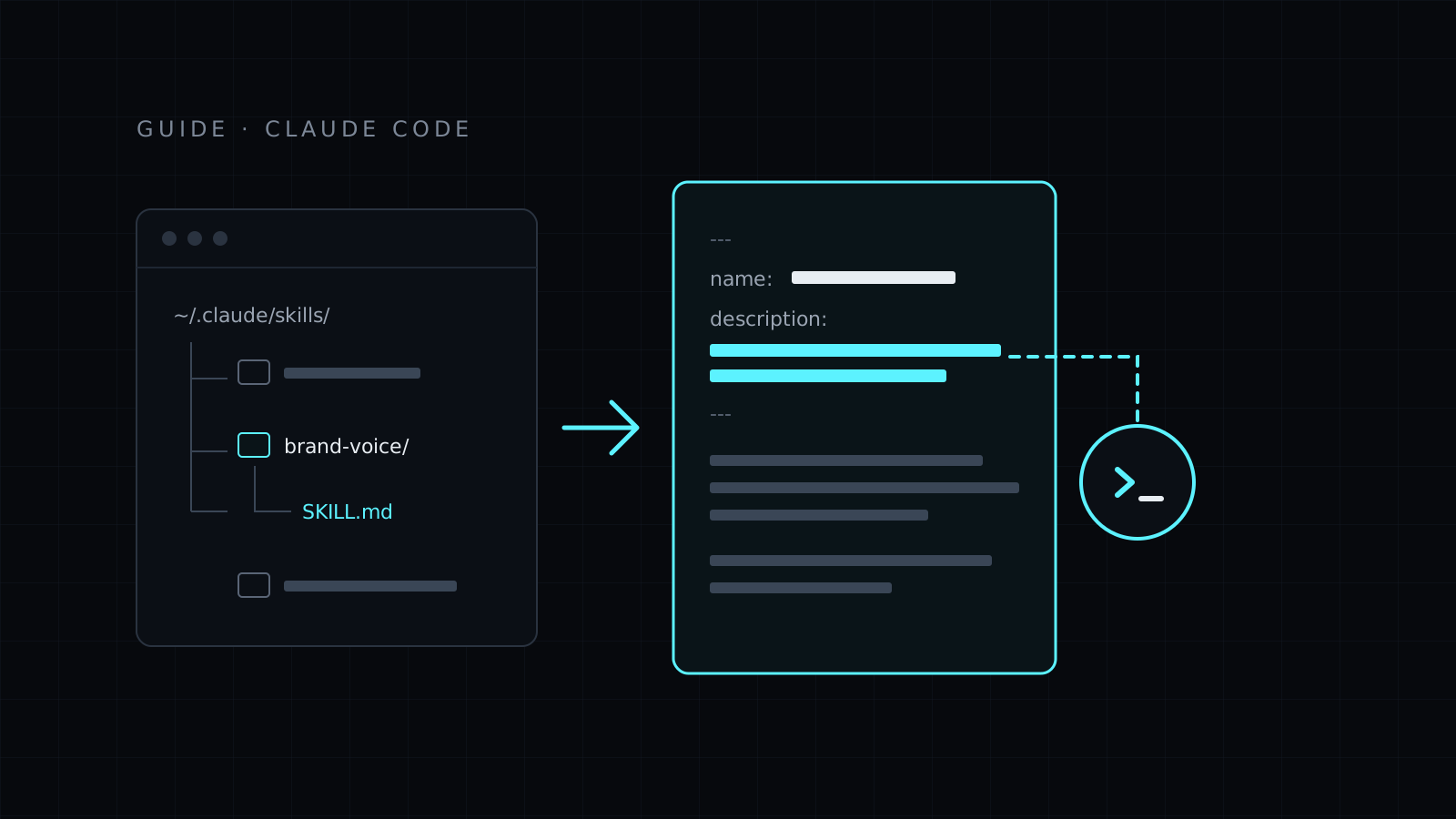
Claude Code looks for skills in two places:
| Location |
Path |
Who gets it |
| Personal |
~/.claude/skills/<name>/SKILL.md |
You, in every project |
| Project |
.claude/skills/<name>/SKILL.md |
Everyone who works in that repository |
Use a personal skill for your own habits (how you like commit messages, your writing voice). Use a project skill for rules the whole team should share, and commit the folder with the code. Plugins can also bring skills with them, but you don’t need a plugin to write one.
The folder name and the file name matter. The file must be called SKILL.md, in capitals, directly inside the skill’s folder.
A SKILL.md has YAML front matter at the very top, then Markdown instructions:
---
name: release-notes
description: Writes customer-facing release notes from recent git commits. Use when the user asks for release notes, a changelog entry or "what shipped" since a tag or date.
---

# Release notes

Instructions Claude follows go here.
Two fields do the work:
- name: lowercase words joined by hyphens, without the words “claude” or “anthropic”. Keep it the same as the folder name.
- description: what the skill does and when to use it. This is the most important line in the file.
How Claude picks a skill up
Claude doesn’t read every skill in full at the start of a session. It sees each skill’s name and description, and when your request matches one, it loads that skill’s SKILL.md and follows it. Files next to it (scripts, references) are read or run only when the instructions point to them.
That is why the description has to say both what and when. “Release notes helper” tells Claude almost nothing. “Writes customer-facing release notes from recent git commits. Use when the user asks for release notes, a changelog entry or what shipped” gives it the job and the words people actually use to ask for it.
You can also call a skill directly by typing / and its name, for example /release-notes, when you want to be sure it runs.
Write your first skill, step by step
This example builds a personal skill that turns recent commits into release notes.
-
Create the folder:
mkdir -p ~/.claude/skills/release-notes
-
Create ~/.claude/skills/release-notes/SKILL.md with this content:
---
name: release-notes
description: Writes customer-facing release notes from recent git commits. Use when the user asks for release notes, a changelog entry or "what shipped" since a tag or date.
---

# Release notes

## Steps

1. Ask which range to cover if the user didn't say: since the last tag, or since a date.
2. List the commits with `git log --oneline <range>`.
3. Drop commits that users never notice: refactors, test-only changes, CI, dependency bumps.
4. Group the rest under three headings: New, Improved, Fixed.
5. Write one line per change, starting with what the user can now do. No commit hashes, no internal names.

## Rules

- Plain words. If a change needs a sentence of context, give it one.
- Never invent a change that isn't in the commits.
- End with the range covered, like "Changes since v1.4.0".
-
Start a new Claude Code session in any git repository, so the new skill is loaded.
-
Ask for the job in plain words:
Write release notes for everything since the last tag.
-
Check the answer follows the skill: three headings, no hashes, the range at the end. If it does, the skill works.
Bundle scripts and references
Keep SKILL.md focused on the steps. Put long material and repeatable commands in files beside it:
release-notes/
├── SKILL.md
├── scripts/
│   └── commits.sh
└── references/
    └── style.md
Then point to them from the instructions:
2. Run `scripts/commits.sh <range>` to list the commits. It already filters out merges.
6. Before you finish, check the wording against `references/style.md`.
Scripts are good for anything that must come out the same every time: listing files, cleaning a CSV, rendering an image. Claude runs them like any other command, with your permission, and only reads the output. References are good for long material Claude needs only sometimes: a style guide, a list of product names, examples of good output.
A few habits that help:
- Use paths relative to the skill folder in the instructions.
- Make scripts executable (
chmod +x scripts/commits.sh) and test them by hand first.
- Say in
SKILL.md exactly when to open each reference, so Claude doesn’t read all of them for every task.
Test the skill
- Trigger it the way a person would. Ask in three or four different phrasings, including ones that don’t use the skill’s name. If one misses, add those words to the description.
- Ask something close but different. “Summarize this commit” shouldn’t trigger a release notes skill. If it does, make the description narrower.
- Check the output against each rule. Every rule you wrote should be visible in the answer. A rule Claude keeps skipping is usually vague; rewrite it as a concrete instruction.
- Check it’s loaded. Ask Claude Code which skills it has available. If yours isn’t listed, check the path and the front matter.
- Try it on real work. A skill that works on a toy example can still miss on a messy repository. Run it on the real thing before you share it.
Common mistakes
- A description without a “when”. Claude decides from the description. If it only names the topic, the skill fires at the wrong times or not at all.
- Broken front matter. The
--- block must be the first thing in the file, with valid YAML. A stray blank line or a missing closing --- is enough to break it. Put the description in quotes if it contains a colon followed by a space.
- The wrong path.
~/.claude/skills/release-notes/release-notes/SKILL.md (one folder too deep, common after unzipping) or skill.md in lowercase won’t load.
- One skill doing five jobs. Split it. Small skills with sharp descriptions get picked more reliably than one large skill with a vague one.
- Two skills that overlap. If two descriptions claim the same requests, Claude has to guess. Make each one say what it is not for, or merge them.
- Everything in SKILL.md. Long examples and lookup tables belong in
references/. Keep the main file to the steps and the rules.
- Hidden assumptions. “Use our usual format” means nothing to Claude. Write the format down or put an example in a reference file.
Next steps
If you haven’t set Claude Code up yet, start with How to Install Claude Code. To add a skill someone else wrote, see Install a Skill in Claude.
For ready-made skills and local kits that render carousels and videos in Claude Code, see Nexin’s skills and kits.